Cloud Storage Manager
for Fluent Forms
Cloud Storage Manager automatically offloads Fluent Forms file uploads to cloud storage, organizes them into dynamic folders, and keeps your WordPress server clean, fast, and scalable.
Supported Cloud Services





Why You Need Cloud Storage Manager?
Agencies collecting client files
HR teams collecting resumes
Schools collecting submissions
Membership sites handling uploads
SaaS onboarding forms
Online exams collecting answer sheets
Legal teams collecting case documents
Real estate firms gathering property files
Event organizers receiving registrations
Healthcare clinics collecting patient forms
Freelancers receiving project assets
Any site using Fluent Forms uploads
Features Cloud Storage Manager Provides
Manage your files with ease and confidence. From upload to organization, everything works seamlessly in one place.
Integrate with native image and input field
Integrate any supported cloud service and manage uploads using your current form fields — no new inputs to create.
Flexible folder naming for effortless organization
Easily name and organize folders your way to keep uploads structured and your workflow efficient.
Fast, smooth submissions with background uploads
Files upload quietly in the background, allowing instant form submission and a seamless user experience.
Full Compatibility with Fluent Forms Integrations
Supports all Fluent Forms integrations with seamless compatibility across tools, workflows, and automations.
Built-in File Explorer and Analytics
Access, organize, and manage your uploaded files directly inside Fluent Forms with the integrated file explorer.
Multiple Cloud Storage Service
Choose from popular cloud platforms such as Google Drive, Dropbox, or AmazonS3, and connect the one that fits your needs.
Supported Storage Services
Connect your forms to your preferred cloud storage platforms
Google Drive
Google Drive makes file storage and collaboration effortless. Access your files anywhere and work seamlessly with Google Workspace.
Dropbox
Dropbox keeps your files organized and synced. Share, collaborate, and access your files from any device.
Amazon S3
Store, manage, and access large files securely with Amazon S3’s scalable cloud storage.
Cloudflare R2
Cloudflare R2 offers fast, cost-effective object storage. Store, manage, and deliver files efficiently with zero egress fees.
Microsoft OneDrive
Securely store, sync, and access personal or work files across devices with Microsoft OneDrive.
Connect Your Preferred Storage Driver in Just a Few Clicks
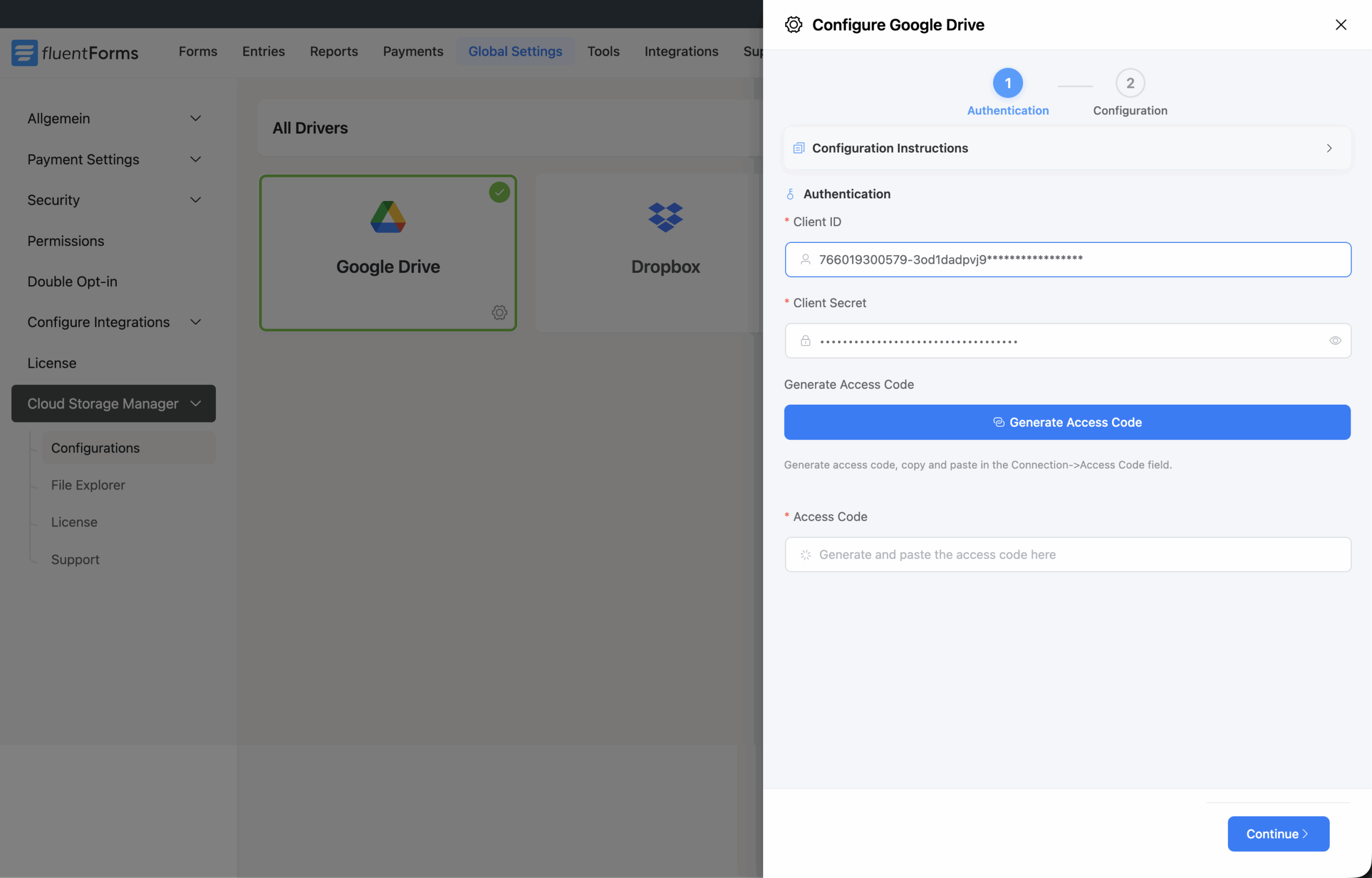
Easily connect your desired cloud storage driver by entering the required credentials into the connection settings. Simply copy and paste your driver credentials, generate the access code, select the parent folder, and complete the connection.
Organize Uploaded Files More Efficiently
Automatically store user-uploaded files in custom folders using values like user country, name, email address, or form submission ID.
Upload and Organize Files with Conditional Logic
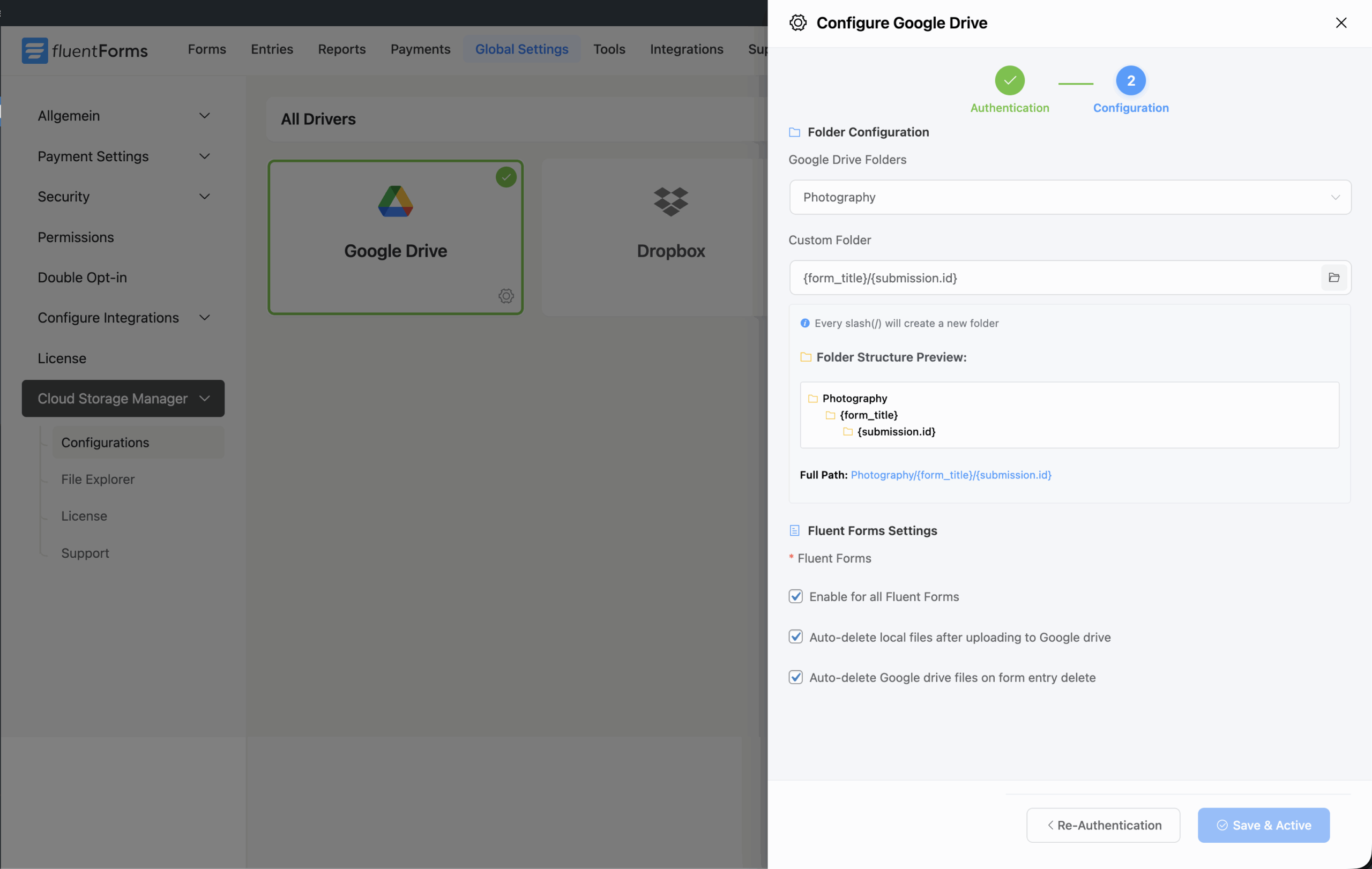
Set custom conditions to organize uploaded files automatically based on user inputs. You can route files to different folders using conditions such as gender, country, age range, or any other form field value.
Cloud Storage Manager Pro also gives you full control over AND/OR condition groups, so you can create flexible rules that match your workflow.
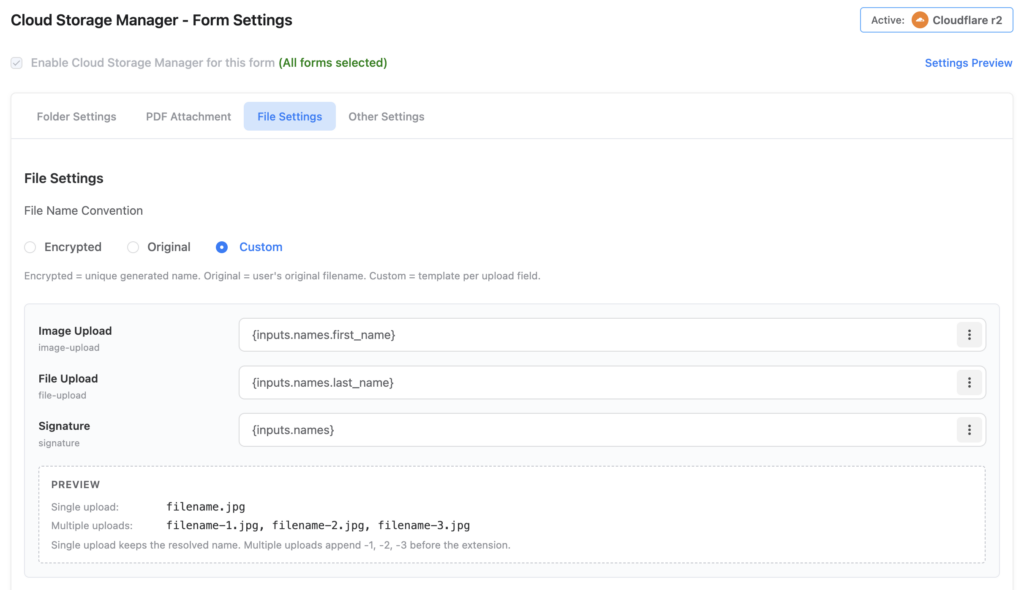
Custom File Naming Using SmartCodes
Rename uploaded files automatically using Fluent Forms SmartCodes like {inputs.names.first_name} or {inputs.names.last_name}. Use field values like name, email, or phone number to generate organized, user-specific file names.
Example: my_new_cv.pdf becomes john_cv.pdf, and signature.png becomes john_signature.png
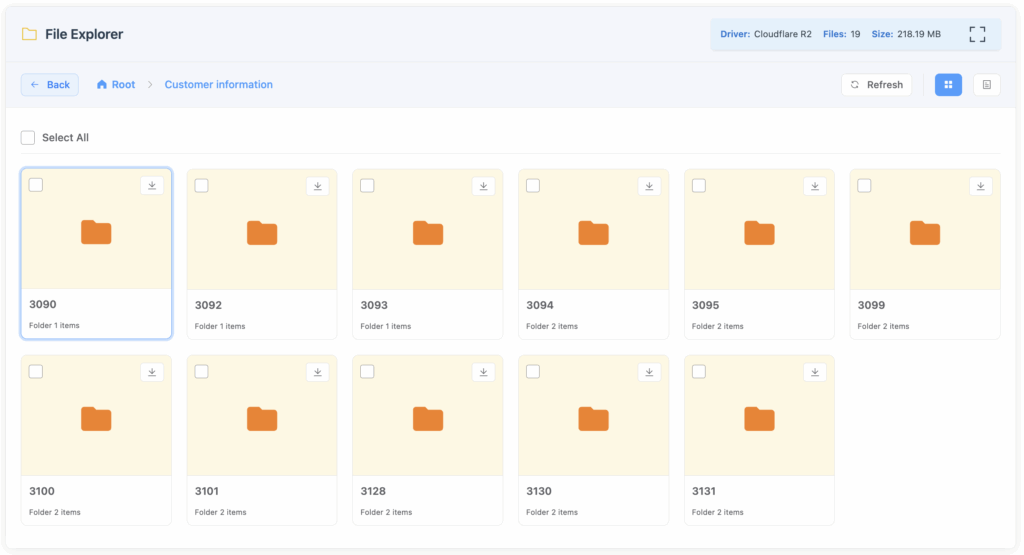
Manage Files Directly Inside WordPress
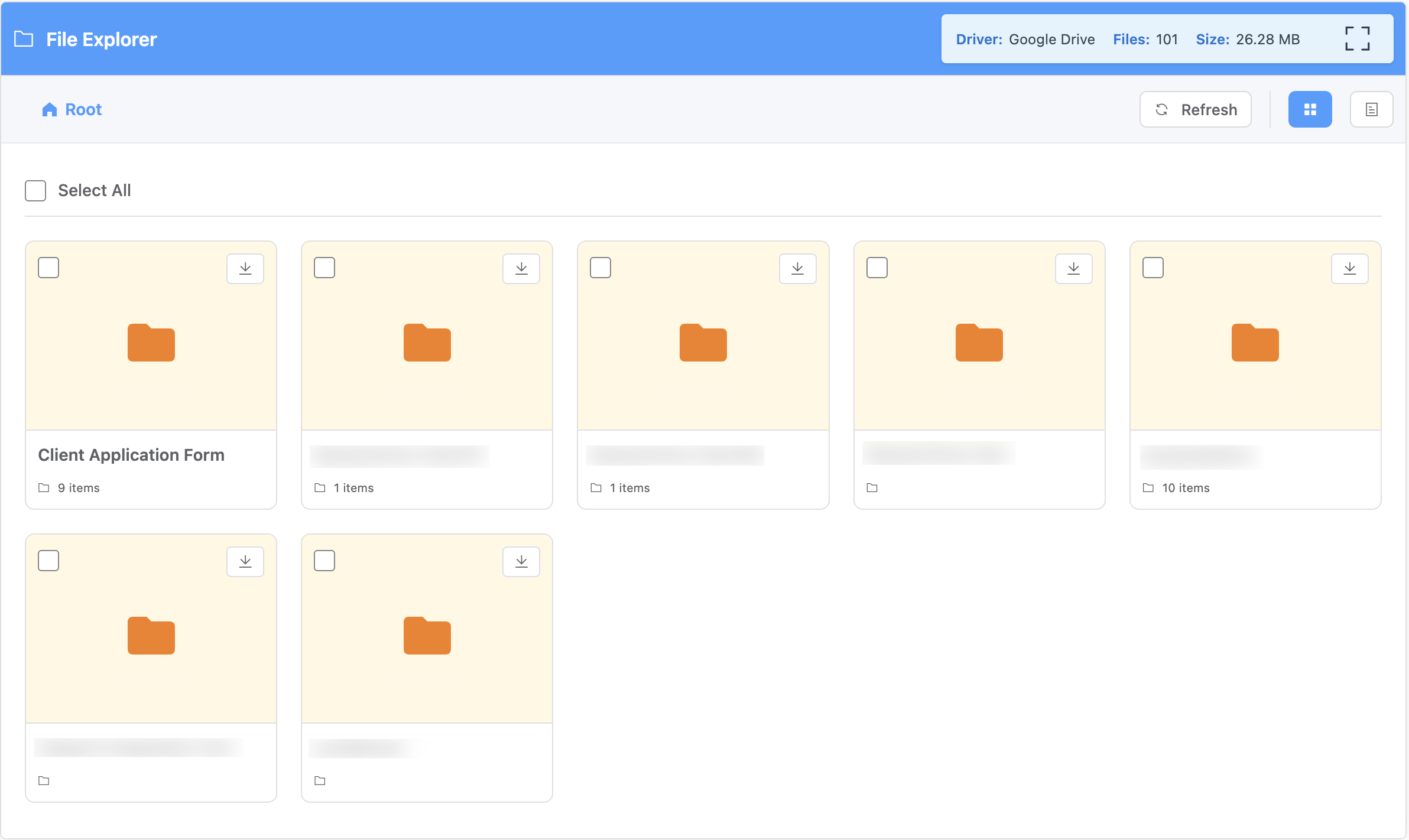
Cloud Storage Manager Pro includes a modern File Explorer that lets you view and download uploaded files directly from your WordPress dashboard—without needing to visit your cloud storage provider.
You can quickly browse stored files, access uploaded documents, and manage user submissions from one centralized place. This saves time, reduces unnecessary switching between platforms, and makes file management easier for site admins.
How It Works
Get up and running with Cloud Storage Manager in just a few simple steps
Install & Activate
Install the plugin through WordPress and activate it from your plugins dashboard.
Connect Services
Set up your cloud storage account credentials and authorize the connections.
Configure Forms
Select which forms should use cloud storage and customize your folder organization.
Start Uploading
Files uploaded through your forms will automatically be sent to your cloud storage.
What our customers say
An Official Fluent Forms–Listed Integration
Cloud storage integration has been one of the top feature requests we’ve received lately. However, the need was understandably diverse: some of you wanted an easy way to send files to Google Drive, while those managing larger sites often asked for scalable solutions like Amazon S3.
To deliver the best solution possible, we decided to team up with the specialists in this area, FluentWiz, to create a cloud storage manager that supports all four services.
Unlock Every Feature, No Matter Which Plan You Choose
Full access, zero restrictions. One plan unlocks it all
$39
1 SITE LIcense / Yearly$79
5 Sites LICENSE / Yearly$179
UNLIMITED SItes license / YEarly$99
1 SITE LIcense / LIFETIME$199
5 Sites LICENSE / LIFETIME$299
UNLIMITED SItes license / LIFETIMEFeature Unlocker: Free vs Pro Edition
| Feature / Capability | Free | Pro |
|---|---|---|
| Supported Cloud Services | Google Drive & Dropbox | All Available and Upcoming Drivers |
| Direct Browser to Cloud Upload | ||
| Custom Folder Naming With ShortCodes | ||
| Advanced File Manager | ||
| Storage Reports & Insights | ||
| Auto-delete Local Files After Uploading To Cloud | ||
| Auto-delete Cloud Files On Form Entry Delete | ||
| Form-specific parent folder path selection | ||
| File Visibility Control – Google Drive & Dropbox | ||
| File Expiration Control - OneDrive, AmazonS3 & CloudFlare R2 | ||
| Upload form entry as a PDF Attachment | ||
| Form-specific (per form) conditional custom folder path selection using form inputs |
Frequently Asked Questions
Find answers to common questions about Cloud Storage Manager
Need Help!
Need help? Submit a support ticket.
What is the next step in the pipeline?
pCloud is a secure cloud storage service that lets you store, access, and share files from any device. It offers fast syncing, file versioning, and built-in media playback. With options for lifetime plans and client-side encryption, pCloud is known for its privacy and user-friendly design.
Timeline:
This Year

Google Workspace(Shared Drive Support)
This service helps you to connect cloud storage manager with your GWS shared drive for more dynamic file management.
Timeline:
This Quarter
Client Facing File Manager
This feature will allow your client to log in to your website and access the files they have uploaded.
Timeline:
This Quarter
Ready to Streamline Your File Management?
Start using Cloud Storage Manager today and connect your Fluent Forms to powerful cloud storage platforms.